
The brochure for your school
Twelve pages for a school head or a teacher who wants the whole picture. Print it as a folded booklet, or send the PDF.
Need it shorter? See the one-pager Lite
Lite
More than a spreadsheet.
A spreadsheet holds scores. SchoolAide Lite also knows the rules. It is a free gradebook for Filipino teachers that grades to DepEd Order No. 015, s. 2026, shows how every grade was made, and carries a class from the first score to the report card.
- A spreadsheet, and Lite
- Every grade explains itself
- Built to the order
- A class record that keeps up
- Your first ten minutes
- The adviser's whole year
- Every learner, seen in time
- Card-giving day
- Recognition and families
- What a school head gets
- How to start
A spreadsheet holds scores.
Lite knows the rules.
Most teachers already keep grades in Excel or the E-Class Record, and it works until a weight is wrong, a co-teacher's file is late, or a parent asks how a grade was reached. Here is what changes when the gradebook knows DepEd Order No. 015.
| What it is | In a spreadsheet | In SchoolAide Lite |
|---|---|---|
| The weights | You type them, and keep them right. | Set by the order for each learning area. No one can edit them. |
| Examinations | A formula you build and hope holds. | Summative 1, Summative 2 and the term exam at 30-30-40, built in. |
| The table | A lookup you copy in by hand. | All 41 bands of the adjusted table, checked against the order's own worked example. |
| Blank, zero, excused | Look alike in a cell. | Three different things, each counted the way the order says. |
| A questioned grade | A number in a cell. | A number that opens to its full working, ready to print. |
| Co-teachers' grades | Files sent around and copied over. | They arrive in the adviser's gradebook on their own. |
| Report cards | Copied onto the SF9, one learner at a time. | The SF9 fills itself, attendance and core values included. |
| Before release | Missing scores are found by hand. | Every missing score is named, with a link to the cell. |
| A lost laptop | Can take the term's work with it. | Every cell saves as you type, and typed scores wait out a dropped signal. |
For the first 15 confirmed teachers at every school.
Weights, split and table, transcribed and tested.
Your gradebook belongs to you, not a school account. Export it any time.
Open any grade.
See exactly how it was made.
A spreadsheet gives you a number. Lite gives you the number and its working, the moment someone asks for it.
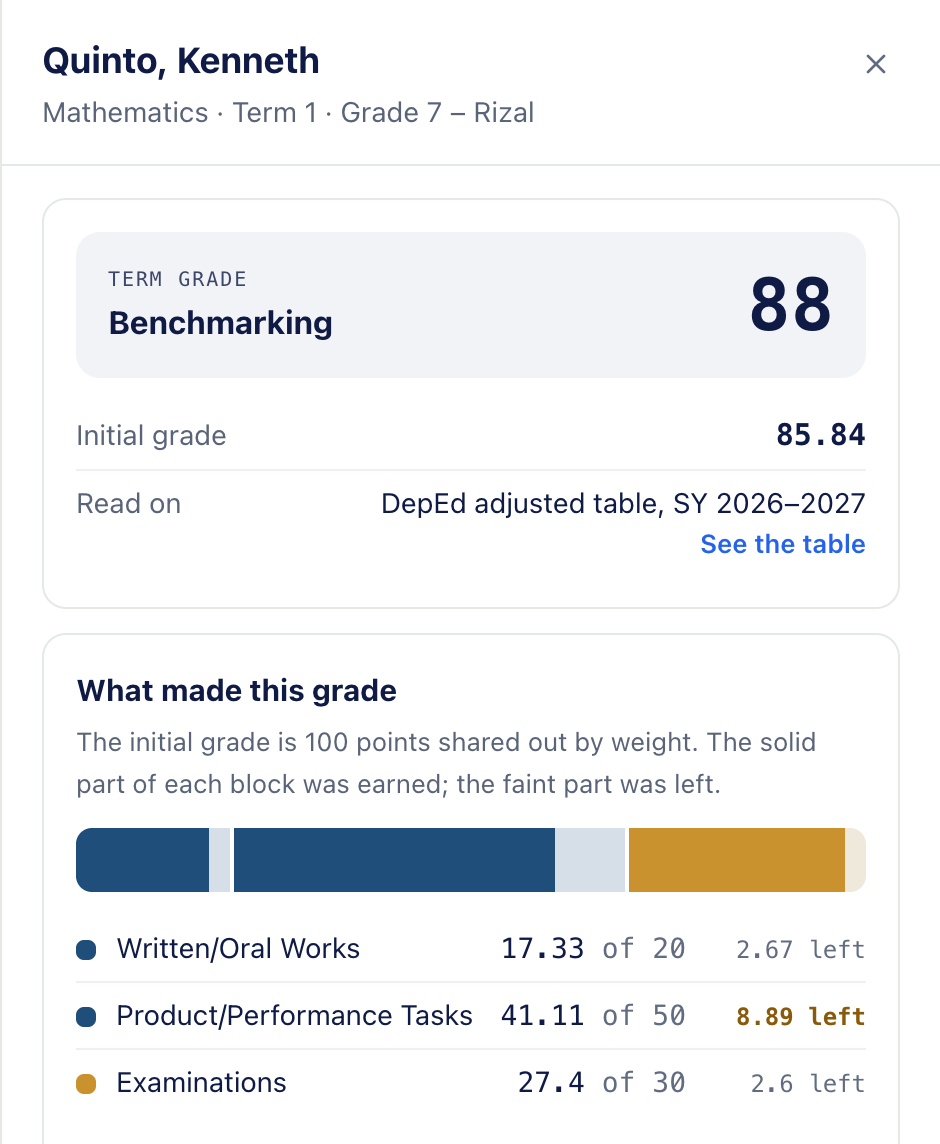
- Every step, on one screen. Scores, percentages, the weight of each component, the initial grade, the band of the transmutation table, and the term grade with its descriptor.
- Where the points went. It names the component that pulled the grade down most and the lowest score inside it, so a conversation starts from facts.
- Where the next points count. A next-term view shows where effort moves the grade most, all else staying the same.
- Ready to print. The whole explanation fits on one page, for a parent conference or a school head's folder.
- Learner by learner. Previous and Next walk the class in roster order without closing the panel.
A parent asks why the grade is 79. You open it and show them.
A school head asks how grades were reached. Every one prints with its working.
You check your own work, grade by grade, before anything goes home.
Built to the order,
line by line.
Lite does not approximate DepEd grading; it follows it. The rules are transcribed from the order and its annexes, and the order's own worked example is the test every change must pass.
The order says 88. Lite says 88.
Learner A, Science 6, Term 1: the worked example in Annex D of DO 015, s. 2026
-
Written works 20% of the grade
74 of 8587.06%
17.41weighted
-
Performance tasks 50% of the grade
43 of 5086.00%
43.00weighted
-
Examinations 30% of the grade
Summative 115 of 2030% Summative 218 of 2030% Term exam35 of 4040%
25.35weighted, from 84.50% combined
-
Initial grade before the table
Table 4 band
85.34 to 86.5185.76to the table
-
Term grade on the card
88
Benchmarkingdescriptor
- Weights no one can edit. Each learning area's weights come from the order. That is what keeps every grade defensible, in every section.
- Three terms, four quarters, two semesters. Three-term classes follow DO 015, s. 2026; classes still on quarters use DO 8, s. 2015; Senior High runs semestral. The choice is fixed once scores exist.
- The one table you choose. The transmutation table: DepEd's, or one you encode, checked and previewed grade by grade before you switch.
- Adjustments in the open. A teacher's adjustment moves the term grade after the table is read, never the initial grade.
- Grouped subjects. MAPEH, TLE and Effective Communication are encoded part by part; the group is what reaches the card.
- Kindergarten to Grade 3. Descriptive grading, with no scores and no weights, phased in by grade as the order schedules it.
- Exact arithmetic. Grades are computed with exact decimals, never rounded early, so a grade near a boundary lands where the order puts it.
- Tested to the order, not to itself. The grading is checked against the order's worked examples every time the code changes.
Encode the way you already do.
The grade follows.
The class record is where a teacher spends the term, so it works like the spreadsheet you know: keys, paste, columns. Every score lands under its DepEd weight, and the term grade updates as you type.
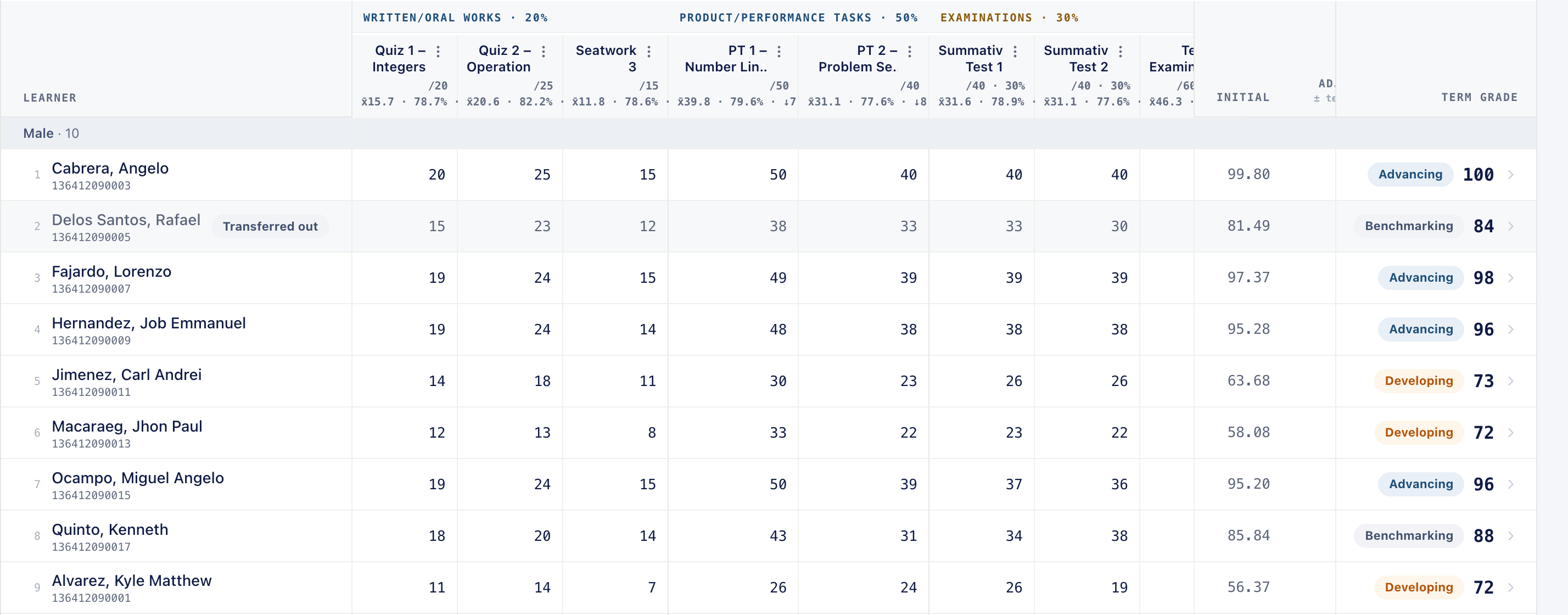
- Keys you already know. Arrow keys move, Enter goes down, Tab goes across, and X marks a score excused.
- Paste a whole block. Copy a range of scores from Excel, several activities wide, and each column lands on its activity in one go.
- Blank, zero and excused. Three different things, each counted the way the order says. A missing score is never quietly read as zero.
- Every cell saves on its own. "All changes saved" stays in view. If the signal drops, typed scores wait on the page and send when it returns.
- Undo, and a history. Undo takes back a change, and every change to a score is kept, with who made it and when.
- Columns that read themselves. Every activity shows its highest possible score, the class mean and the percentage as you go.
- Grouped subjects, part by part. Encode each part of a grouped subject separately; MAPEH is what reaches the card.
- Mark as done. Your adviser sees the subject is finished, and its scores close until you reopen them yourself.
- Downloads. The class record and activity analysis export as spreadsheets whenever you need them.
From sign-up to a first grade
in about ten minutes.
No training, no installation and no principal's sign-off. Have your class list open in Excel and follow the screen.
- Sign up with your school email. A DepEd or school address is confirmed on the spot. Any other address is reviewed by a person.
- Create your class. Grade, section, and the term structure your school runs: three terms, four quarters, or two semesters.
- Paste your class list. From Excel or your E-Class Record. Names, LRNs and sex are picked up for you to check before anything is saved.
- Add subjects and invite co-teachers. By email or with your class code. Their gradebooks link to your section.
- Encode a score. The first term grade computes the moment it lands.
Rather look first? The dashboard offers a sample class, Grade 7 – Demo Section, with twenty fictional learners and scores already encoded. Every feature works on it, and you delete it in one click.
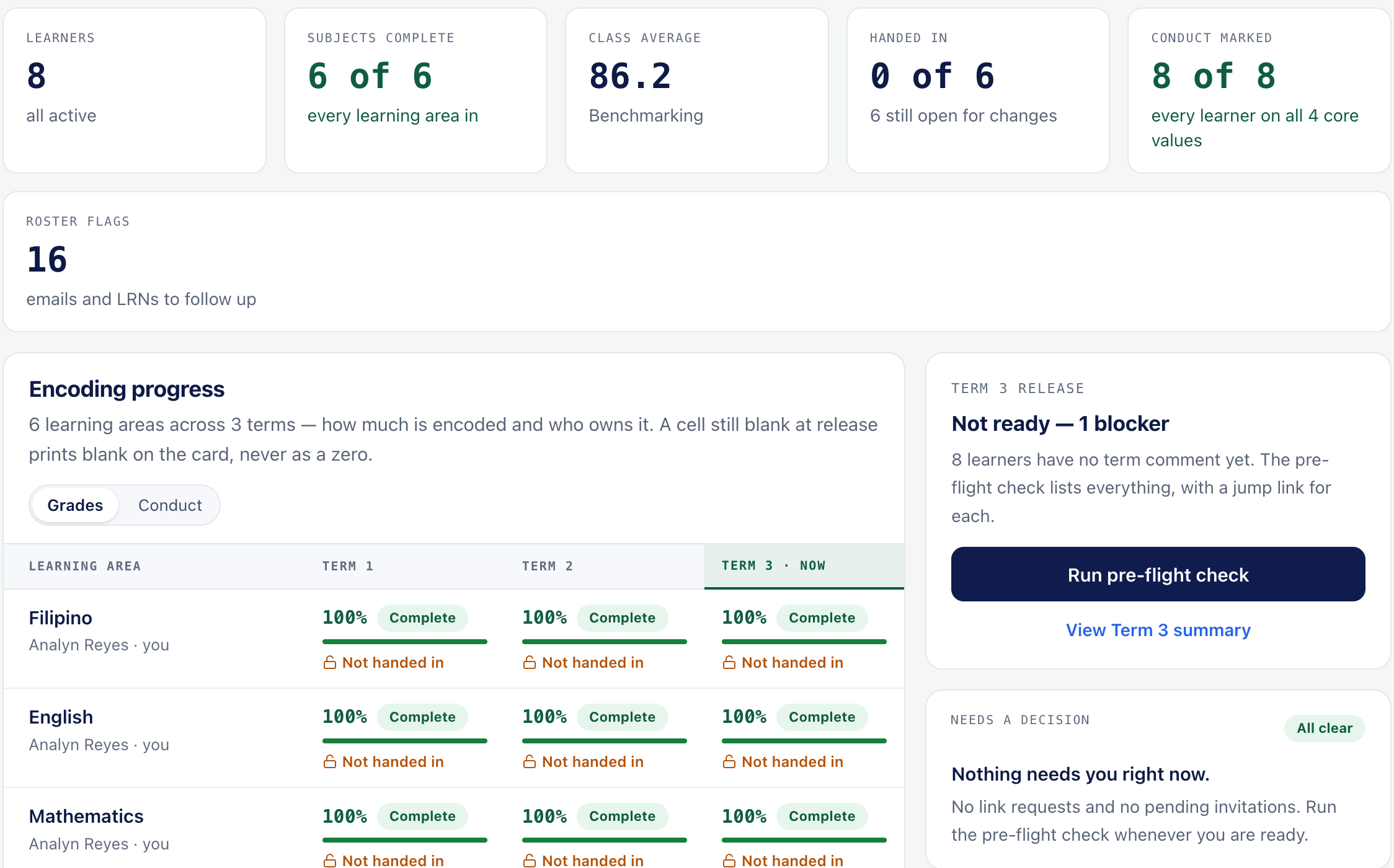
- Help on every screen. Each page opens with a short guide to what it is for, and every error names its cause and its fix.
- A self-check when something looks off. The help panel runs a check that names the cause, and the help center covers the rest.
One class,
the whole school year.
An adviser does not keep one gradebook; they gather everyone's. Lite does the gathering, so every subject in the section, every term and every learner sit in one place, through to promotion.
- Class listpasted from Excel
- Scoresby every subject teacher
- Term gradesto DO 015, explained
- Final gradesgeneral average and promotion
- Awardsfrom the general average
- SF9 and merit cardsprinted or linked
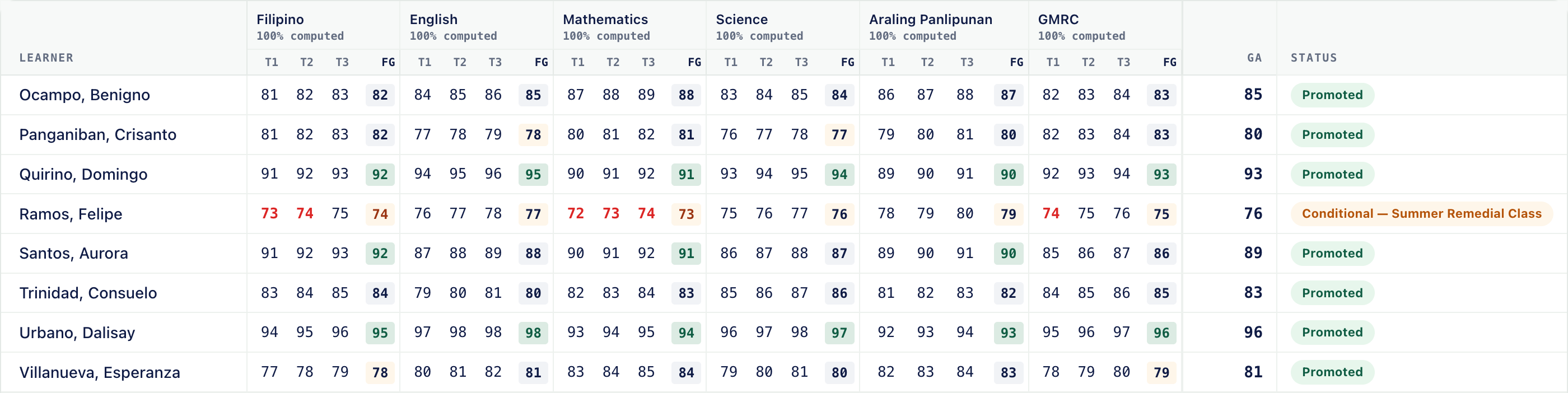
- Co-teachers on one roster. Invite subject teachers by email or class code. Their gradebooks link to your section, and their grades arrive in yours as they encode.
- Your roster is the list of record. Learners are matched by LRN, then email, then name, and you review every match before anything happens. Their scores stay exactly as encoded.
- Final grades and promotion. Final grades average the terms, the general average follows, and promotion status is decided at year end, with a place to record a remedial mark.
- Who has handed in. Each subject shows how much is encoded and whether its teacher has marked the term done.
- Awards from the general average. Award tiers are evaluated for you, with merit cards to match.
- Rankings, for your planning. A working view of where learners stand, on the general average or a single term.
Every learner,
seen before card day.
The numbers that matter most are the ones still changing. Attendance, conduct and early warnings sit beside the grades, so help can arrive while there is still a term to give it.
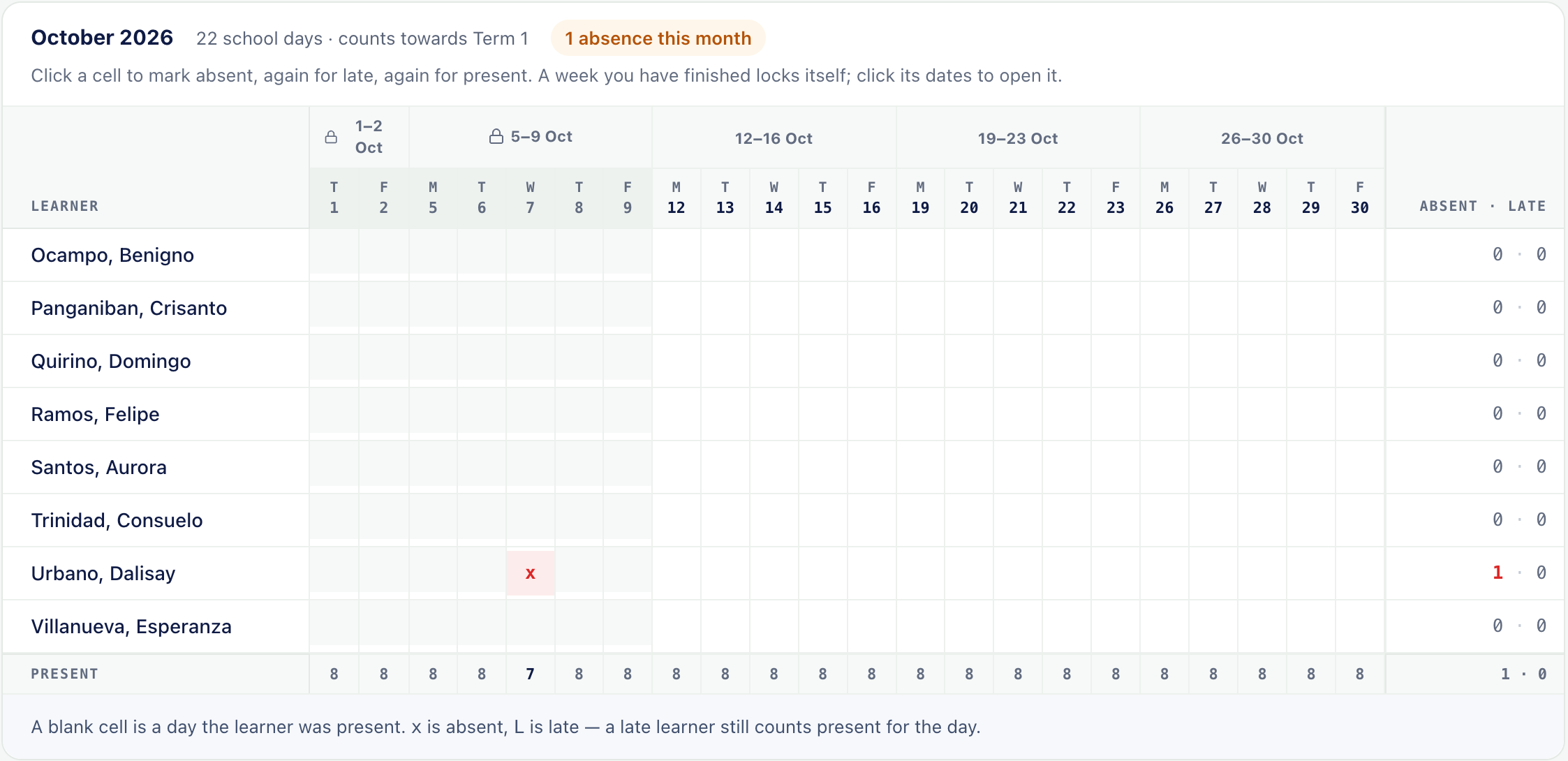
- Attendance, a month at a time. Click once for absent, again for late. A finished week locks itself, and the term totals on the report card follow from it.
- Core values, observed. Maka-Diyos, Makatao, Makakalikasan and Makabansa, marked per grading period and printed on the back of the SF9.
- Learners to look at. A private working list, with the reason beside each name: below 75, a sharp drop, missing scores, or unjustified absences over the limit the order sets.
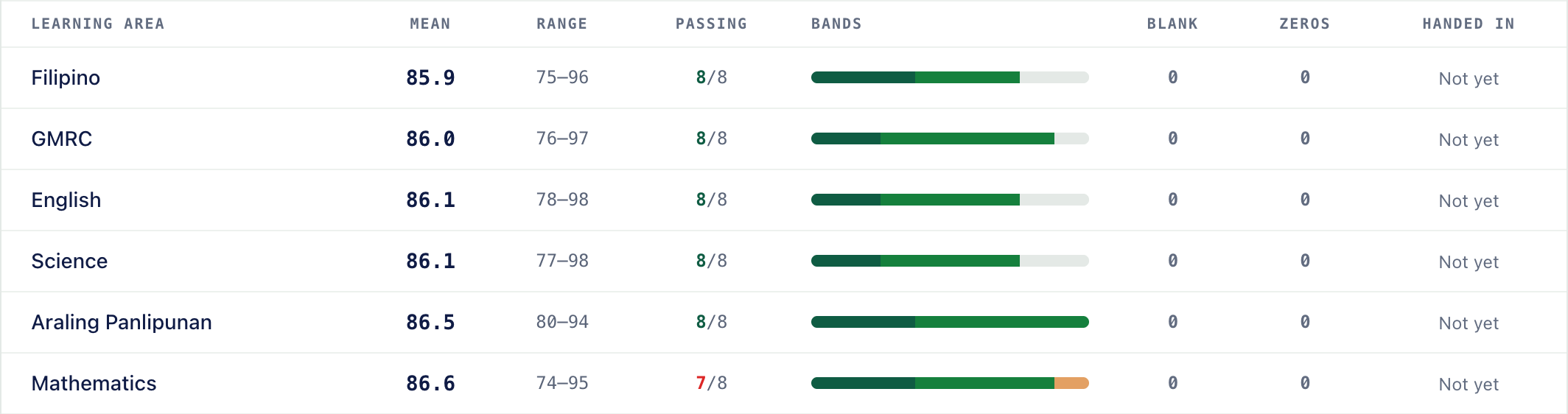
- Class analysis. The whole class read at once: learning areas ordered by where the class needs most help, how many pass, the spread of grade bands, and where encoding is thin.
- It orders your work, never the learners. These views point you to where help is needed, and nothing in them is printed on a report card.
Report cards that
fill themselves.
No copying grades onto forms the night before. The SF9 comes straight from the gradebook, checked before it leaves, and reaches every family: on paper, or by a private link.
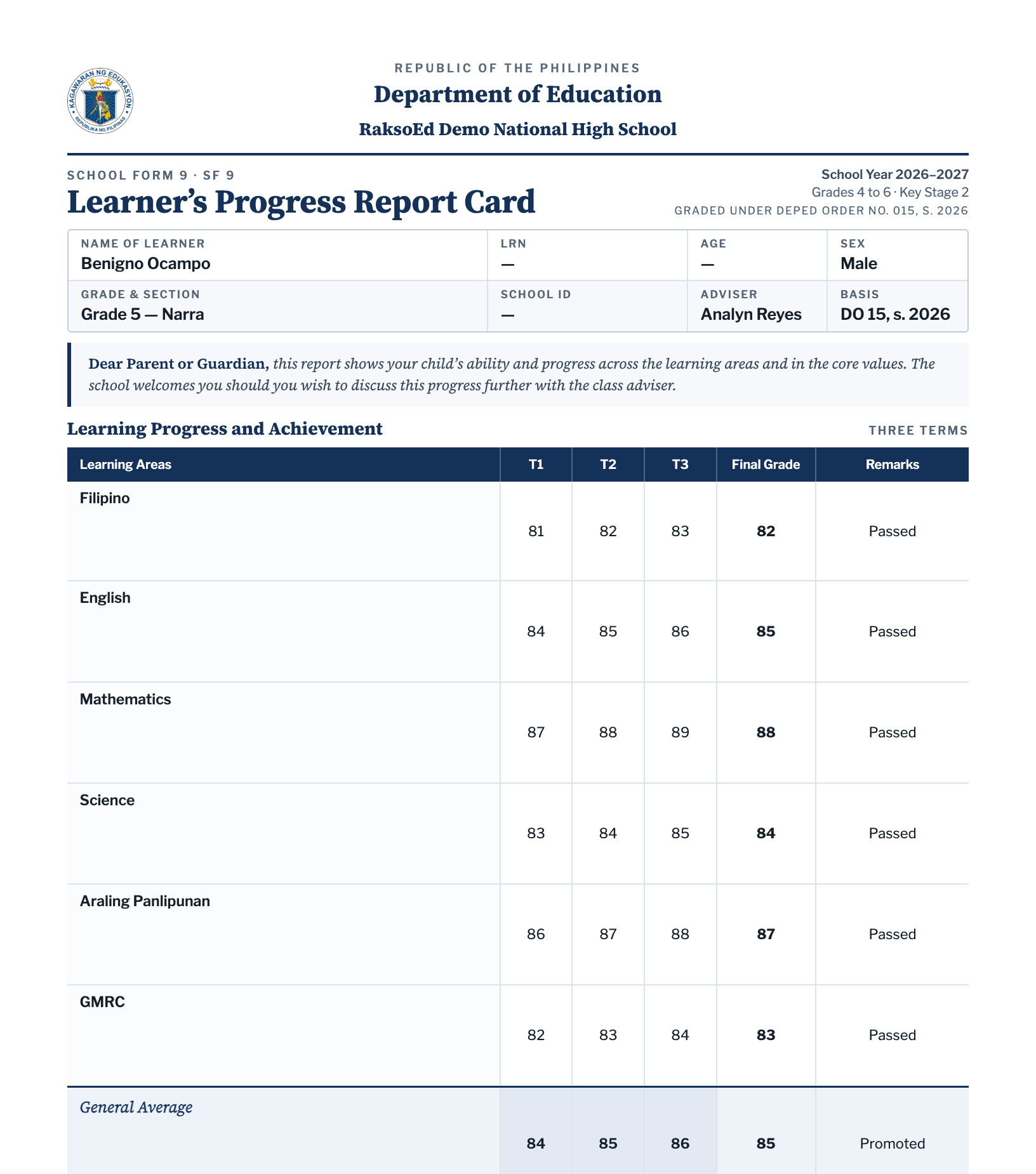
- The SF9, in the DepEd layout. Term and final grades and the general average, with attendance, core values and descriptors, on one page or front and back.
- A check before release. Every missing score and comment is named, with a link to fix it, so nothing goes out half done.
- Print the class, or send links. One PDF for the whole class in DepEd order, or a signed link to each learner's own card that expires after thirty days. Email is optional throughout.
- Teacher's comments, faster. Write a comment per learner, keep the phrases you use most, and jump to the next learner without one.
- Cards anyone can check. Every card carries a QR code and a reference that verify it online, and a watermark that names the learner.
- Take a release back. Revoke it, fix the score, and release again. Links from the earlier release stop working.
Recognition, and a card
in every family's hands.
The year ends with honours to give and cards to send home. Lite prints both, and gives each family a way to see their own child's card, and nothing else.
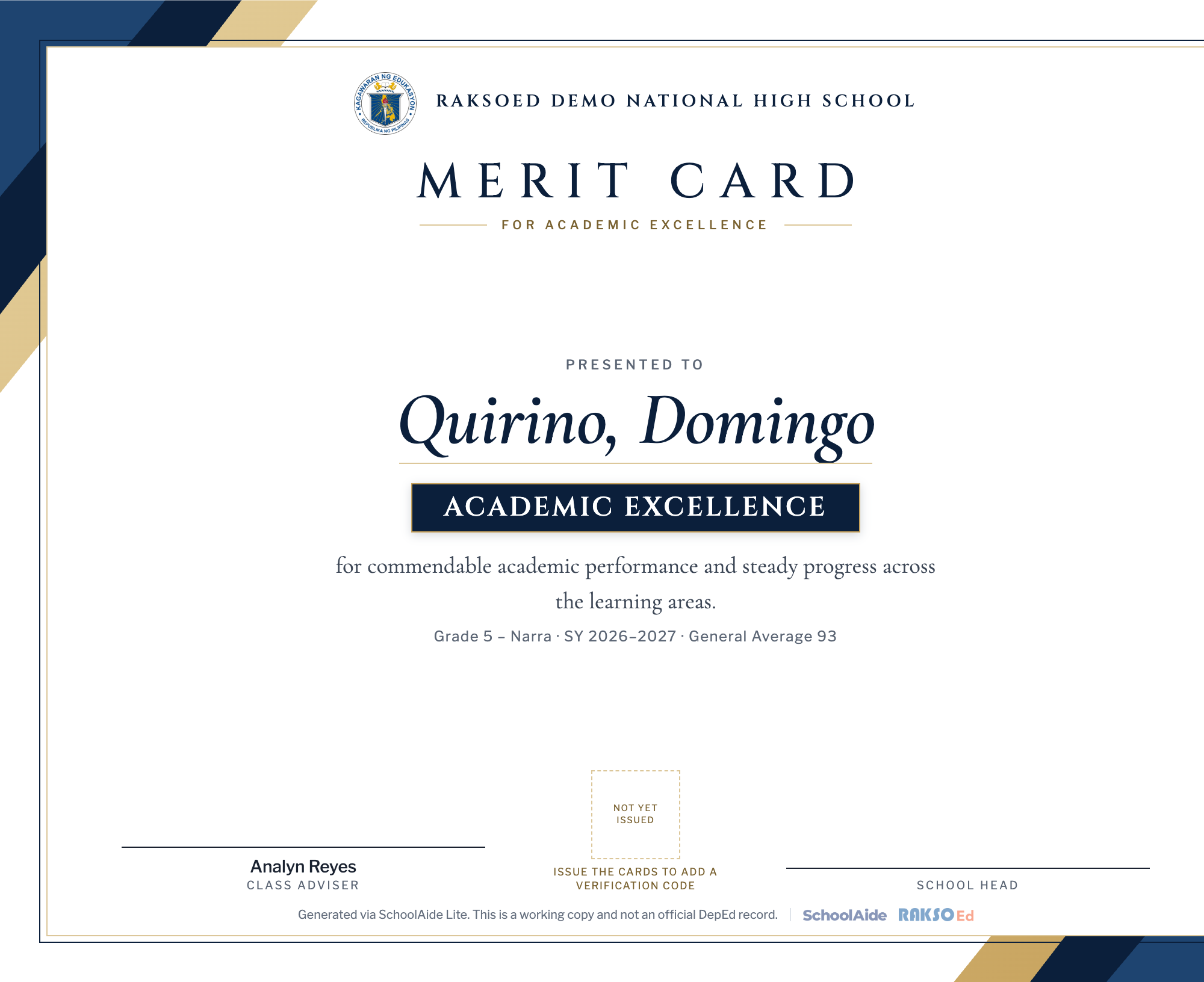
- Merit cards, ready to print. Academic Excellence, With Honors and With High Honors, evaluated from the general average and printed in a layout you choose.
- Ready for signatures. Each card carries the class, the school year and the general average, with lines for the adviser and the school head, and a verification code once issued.
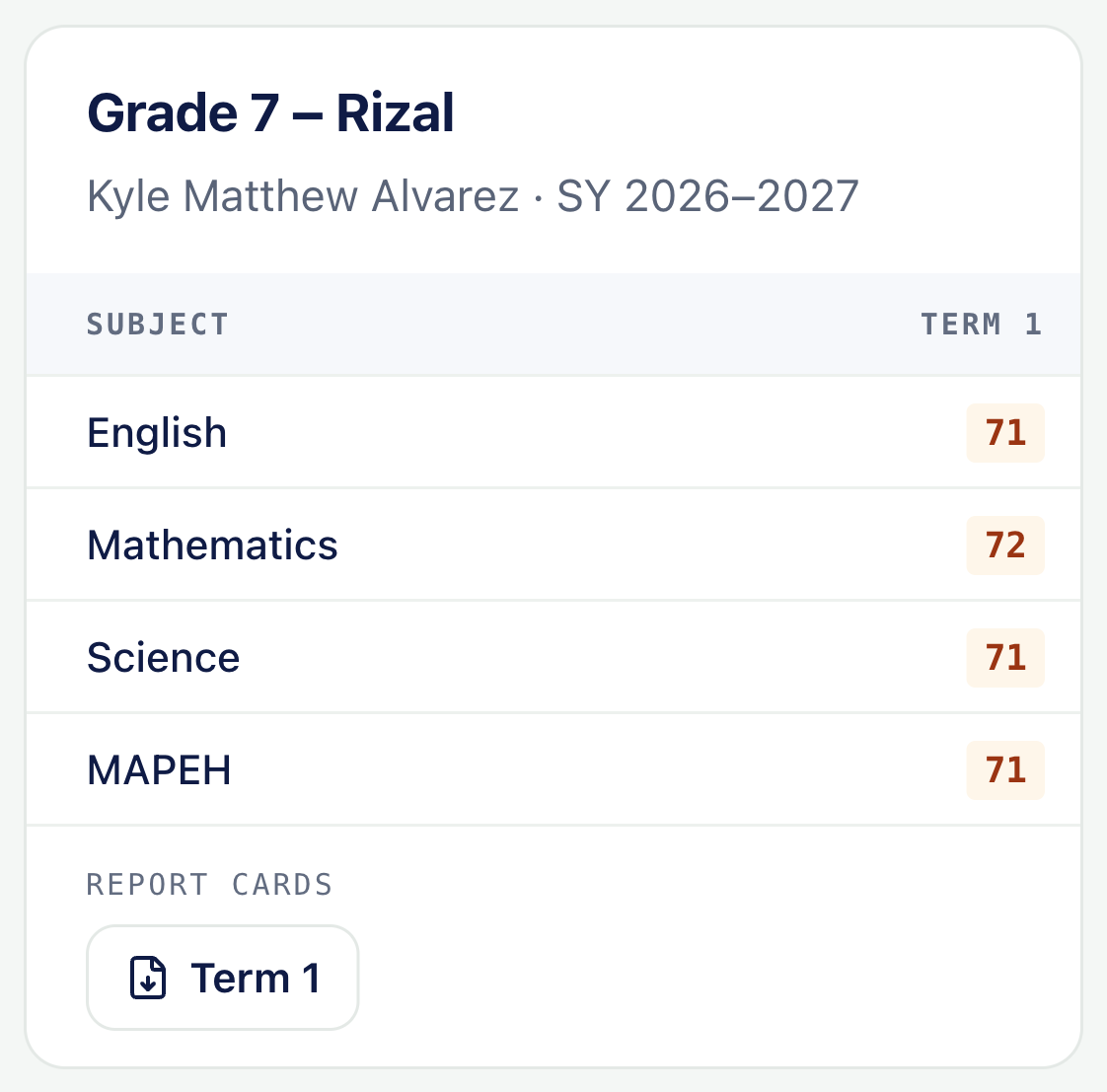
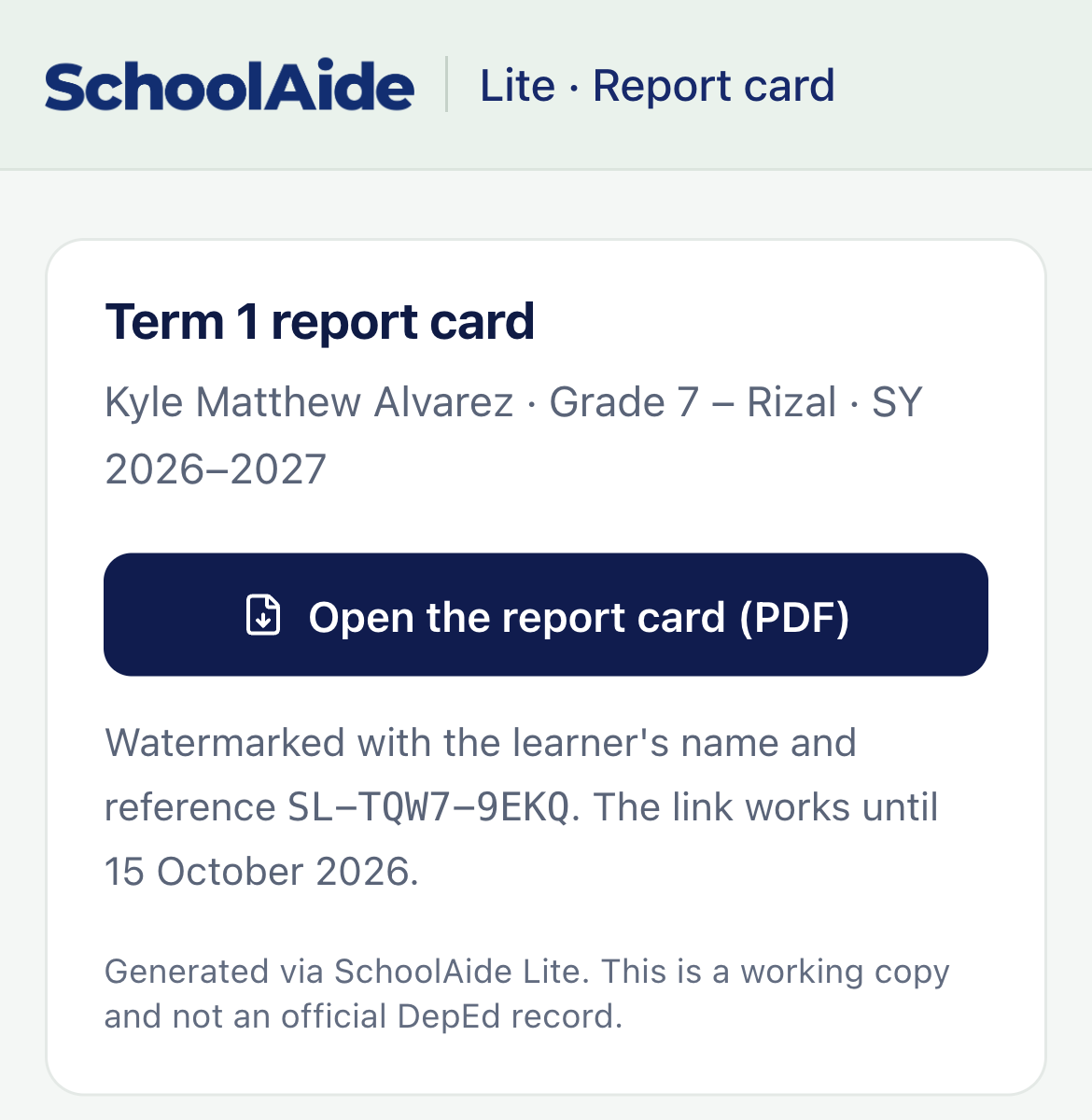
- A learner's own account. A learner joins with the class code and the adviser approves the link. They see only their own grades, and only once a term is released.
- Guardian consent first. A learner under 18 sees nothing until a parent or guardian consents through an emailed link, and consent can be withdrawn any time.
- A link for parents, no account needed. The link opens that learner's card and nothing else, names its reference, and stops working after thirty days.
- Print is first class. A family without email gets the printed card, in the same batch, in DepEd order.
What a school head gets.
Nothing to buy, install or administer. Each teacher signs up on their own and keeps their own gradebook; the school gets grades it can stand behind, and records it can use.
- One rule book for every class. No one can edit the weights, so every section is graded the same way, by every teacher.
- Grades that can be defended. Any grade opens to the arithmetic behind it, on a page that prints.
- Problems seen before card day. Advisers see who needs a second look and why, while there is still a term to help.
- Records the school can use. Consolidated grades, the class record, the banig, the at-risk list and activity analysis export as spreadsheets, any time.
- Cards that can be checked. Every card carries a QR code and reference that verify it against the record it was issued from.
- Teachers verified, not just signed up. A DepEd or school email is confirmed on the spot; any other address is reviewed by a person.
Learner data, handled with care
- Registered. With the National Privacy Commission, under the Data Privacy Act of 2012.
- Encrypted. LRNs are encrypted at rest and never written to logs.
- On the record. Every change to a grade, a score, a roster or a release is on an audit trail.
- Consent first. A learner under 18 sees nothing until a guardian consents.
- Owned by the teacher. No school account owns a gradebook, and everything exports as a spreadsheet.
- Nothing left behind. An unused account is archived after twelve months and purged after twenty-four, with four warnings first.
- Signed in safely. With a school email and password, Google or Microsoft, or a passkey.
- Help without a hotline. Every screen explains itself; a help center and our Facebook page cover the rest.
- Made by RaksoEd. The team behind SchoolAide, the school-wide system. Lite is not a trial of it.
Lite
Set up your
gradebook.
About ten minutes, with your class list open. No installation, no training, and no principal's sign-off.
- Go to lite.schoolaide.phand sign up with your DepEd or school email.
- Paste your class listfrom Excel or your E-Class Record.
- Encode a score.The grade follows.
Or walk through the demo class first, no sign-up needed.
Free for your school's first 15The first 15 confirmed teachers at every school hold a free license.
A license of your ownAfter that, a teacher can pay for their own license to the end of the school year, or keep a free account.
Never behind a licenseDepEd grades, encoding, your class record, and deleting your data.